Understanding HDCP: Why Protected Content Sometimes Won’t Display
You’re minutes away from an important presentation. You connect your laptop to the meeting room display, open a streaming platform or protected video, and suddenly the screen turns black. The display is detected, the HDMI cable is connected, but the content refuses to appear.
This is a situation many AV professionals encounter, and in most cases, the cause is HDCP.
HDCP operates behind the scenes to protect copyrighted digital content from unauthorized copying. While users rarely notice it when everything works correctly, a failed HDCP handshake can interrupt presentations, training sessions, digital signage, and video conferencing workflows.
Understanding HDCP is essential for anyone involved in designing, installing, or supporting professional AV systems.
What is HDCP?
HDCP (High-bandwidth Digital Content Protection) is a copy protection technology developed to prevent unauthorized recording and distribution of digital audio and video content.
Whenever protected content is played through an HDMI, DisplayPort, or similar digital connection, the source device first checks whether the connected equipment is authorized to receive that content.
If every device in the signal path supports HDCP, playback begins normally.
If any device fails the authentication process, the content may not be displayed at all.
Why Was HDCP Created?
Movie studios, streaming providers, and content creators invest heavily in producing digital content.
Without protection, anyone could easily capture high-quality copies of movies, television programs, or premium broadcasts during playback.
HDCP helps prevent this by allowing content to be displayed only on authorized devices.
It protects copyrighted material while still allowing legitimate viewing on compatible displays.
How Does HDCP Work?
Whenever a source device is connected to a display, a verification process begins before any protected content is shown.
The source asks the display to confirm that it supports HDCP.
The display responds with its authentication information.
If the verification is successful, video and audio playback begins immediately.
If authentication fails, the source blocks the protected content from being displayed.
This process happens automatically within seconds and is completely invisible to the user.
A Real-World Example
Imagine you’re conducting a corporate training session.
A laptop is connected to a conference room display through a matrix switcher.
The trainer opens a protected educational video from a streaming service.
If the laptop, switcher, HDMI extender, and display all support the same HDCP version, the video plays normally.
However, if the matrix switcher or extender does not support the required HDCP version, the screen may remain black even though the system appears to be functioning correctly.
Devices That Participate in HDCP
In a professional AV installation, HDCP authentication may involve several devices.
These commonly include:
- Laptops
- Desktop computers
- Streaming devices
- Media players
- Matrix switchers
- HDMI extenders
- AV over IP encoders
- AV over IP decoders
- Video wall controllers
- Projectors
- Professional displays
- LED processors
Every device in the signal chain must support compatible HDCP standards when protected content is involved.
Common Symptoms of HDCP Problems
HDCP issues often resemble hardware failures, making them difficult to identify.
Typical symptoms include:
- Black screen during video playback
- “HDCP Error” message
- Protected content fails to display
- Audio plays without video
- Video appears briefly before disappearing
- One display works while another remains blank
- Streaming platforms refuse to play content
Recognizing these symptoms can significantly reduce troubleshooting time.
Common Causes of HDCP Failure
Most HDCP issues occur because one or more devices in the signal path cannot complete the authentication process.
This may happen due to outdated equipment, incompatible HDCP versions, damaged HDMI cables, firmware issues, or unsupported AV extenders.
Even a single incompatible device can prevent protected content from reaching the display.
HDCP Versions
Over time, HDCP has evolved to support newer technologies and higher resolutions.
Modern AV equipment commonly supports HDCP 2.x, which is designed for 4K and UHD content.
Older AV hardware may support only HDCP 1.x.
When devices using different HDCP versions are combined, compatibility issues can occur.
For this reason, system designers should verify HDCP compatibility during the planning stage rather than after installation.
HDCP in Professional AV Systems
Professional AV environments often include multiple displays, switchers, extenders, and distribution systems.
Each additional device increases the importance of proper HDCP compatibility.
Boardrooms, auditoriums, classrooms, command centers, and digital signage networks frequently distribute content across several displays simultaneously.
Ensuring that every component supports the required HDCP standard helps prevent unexpected playback failures during live events or presentations.
Best Practices
Choose professional AV equipment that supports current HDCP standards.
Keep firmware updated across all AV devices.
Use certified HDMI cables for reliable communication.
Verify compatibility before integrating new equipment into an existing system.
Test protected content during commissioning rather than waiting until the day of an important presentation.
Document the HDCP capabilities of installed equipment to simplify future upgrades.
Common Mistakes to Avoid
Avoid mixing older and newer AV equipment without checking HDCP compatibility.
Do not assume that replacing an HDMI cable will solve every black-screen issue.
Never ignore firmware updates that improve HDCP interoperability.
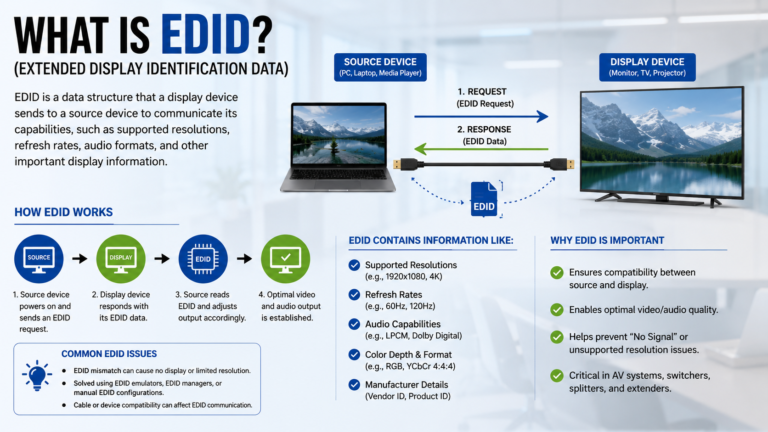
Most importantly, avoid diagnosing every “No Signal” problem as an HDCP issue before verifying power, cabling, EDID, and input selection.
A systematic troubleshooting approach always delivers better results.
Final Thoughts
HDCP is an essential part of modern digital video technology. Although users rarely interact with it directly, it plays a crucial role in protecting copyrighted content while ensuring secure communication between AV devices.
For AV professionals, understanding HDCP helps eliminate one of the most common causes of unexpected video failures in conference rooms and commercial AV installations.
By selecting compatible equipment, maintaining updated firmware, and following proper installation practices, you can build AV systems that deliver reliable performance even when protected content is involved.
Continue exploring AV Insider for practical guides, installation tips, and expert insights that help you master the technologies powering today’s professional audiovisual systems.