
How Acoustic Echo Cancellation (AEC) Works in AV Systems
The Technology Behind Clear Audio in Microsoft Teams Rooms, Zoom Rooms, and Modern Meeting Spaces
Introduction
Have you ever been in a meeting where you hear your own voice coming back a few seconds later?
That’s called echo, and it can quickly make meetings frustrating and unproductive.
In modern conferencing environments, clear communication is essential. Whether it’s a boardroom, classroom, training room, or hybrid workspace, users expect crystal-clear audio without distractions.
This is where Acoustic Echo Cancellation (AEC) comes into play.
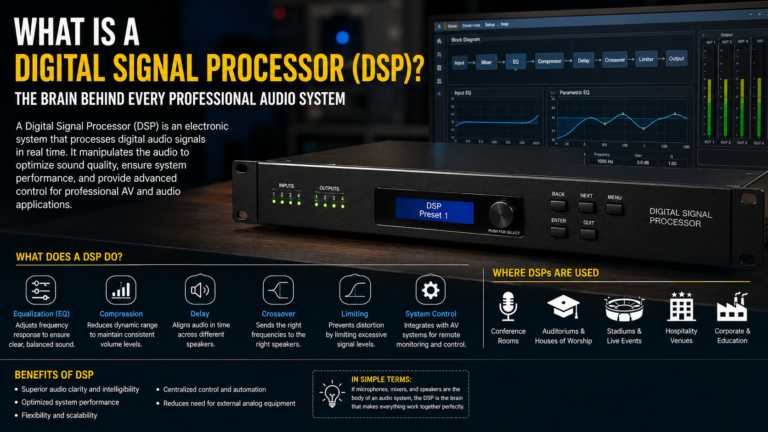
AEC is one of the most important technologies inside DSPs, conferencing systems, and collaboration platforms, helping eliminate echo and improve speech clarity.
What is Acoustic Echo?
Acoustic echo occurs when audio played through room speakers is picked up by microphones and sent back to the far-end participants.
Example
- Remote participant speaks.
- Audio plays through room speakers.
- Microphone picks up the speaker audio.
- The audio is transmitted back into the call.
- Remote participant hears their own voice.
Result:
❌ Echo
❌ Poor meeting experience
❌ Communication difficulties
What is Acoustic Echo Cancellation (AEC)?
AEC is a digital signal processing technology that identifies and removes speaker-generated audio before it is transmitted back into the meeting.
Simply put:
🎤 Microphone hears everything
🧠 AEC identifies the speaker audio
🚫 AEC removes the echo
✅ Only user speech is transmitted
Why is AEC Important?
Without AEC:
- Meetings become difficult to follow
- Remote participants hear themselves
- Conversations become disruptive
- User experience suffers
With AEC:
✅ Natural conversations
✅ Clear speech
✅ Improved collaboration
✅ Professional meeting experience
How AEC Works
Basic Signal Flow
Remote Participant
        ↓
Room Speakers
        ↓
Microphone
        ↓
AEC Processing
        ↓
Far-End Participants
The AEC processor continuously compares:
- Speaker output audio
- Microphone input audio
It then removes matching signals before transmission.
Real-World Example
Imagine a Teams meeting:
Without AEC
Remote User: “Can everyone hear me?”
Room Speaker: Plays audio
Microphone: Picks up speaker audio
Remote User: Hears their own voice
Result:
❌ Echo
With AEC
Remote User: “Can everyone hear me?”
Room Speaker: Plays audio
Microphone: Picks up room audio
AEC: Removes speaker-generated sound
Remote User: Hears only local participants
Result:
✅ Clear communication
Where is AEC Used?
Microsoft Teams Rooms
AEC is critical for:
- Boardrooms
- Conference Rooms
- Hybrid Workspaces
Zoom Rooms
AEC ensures smooth communication between local and remote participants.
Classrooms
Used for:
- Distance Learning
- Lecture Capture
- Virtual Training
Auditoriums
AEC prevents echo during:
- Presentations
- Town Halls
- Hybrid Events
AEC in DSP Systems
Most professional DSPs include built-in AEC processing.
Popular platforms include:
🎛️ Biamp Tesira
Advanced multi-channel AEC.
🎛️ Q-SYS Core
Enterprise-grade echo cancellation.
🎛️ Shure IntelliMix
Optimized for conferencing environments.
🎛️ Symetrix DSP
Flexible AEC processing for AV systems.
Factors Affecting AEC Performance
Microphone Placement
Poor microphone positioning can reduce AEC effectiveness.
Best practice:
✅ Place microphones closer to participants.
Speaker Placement
Speakers positioned too close to microphones increase echo risk.
Best practice:
✅ Maintain adequate separation.
Room Acoustics
Highly reflective rooms can create additional challenges.
Examples:
- Glass Walls
- Hard Floors
- Concrete Surfaces
Best practice:
✅ Add acoustic treatment where necessary.
Gain Structure
Improper gain settings can negatively impact AEC performance.
Best practice:
✅ Optimize microphone and speaker levels.
Common AEC Mistakes
Multiple AEC Processors
Running multiple AEC engines simultaneously can create audio issues.
Example:
- DSP AEC enabled
- Teams AEC enabled
- Additional software AEC enabled
Result:
❌ Audio artifacts
❌ Speech distortion
Incorrect Reference Signal
AEC requires a proper reference of speaker audio.
Without it:
❌ Echo remains
Excessive Microphone Gain
Over-amplified microphones can capture unnecessary room noise and speaker audio.
Signs AEC is Not Working Properly
Watch for:
⚠️ Remote users hearing themselves
⚠️ Delayed audio reflections
⚠️ Complaints of echo during meetings
⚠️ Audio feedback issues
⚠️ Speech clarity problems
AEC vs Noise Cancellation
Many people confuse these technologies.
AEC
Removes speaker-generated echo.
Noise Cancellation
Removes unwanted background sounds such as:
- Air conditioning
- Keyboard typing
- Fan noise
- Traffic sounds
Both technologies are often used together.
Why AEC Matters in Hybrid Work
Hybrid work has made audio quality more important than ever.
Remote participants expect:
✅ Natural conversations
✅ Clear voices
✅ Minimal distractions
AEC plays a critical role in delivering that experience.
Without proper AEC, even expensive AV systems can perform poorly.
Future of Acoustic Echo Cancellation
Modern AEC technologies increasingly use:
- Artificial Intelligence
- Machine Learning
- Voice Tracking
- Advanced DSP Algorithms
These innovations continue improving meeting quality and user experience.
Conclusion
Acoustic Echo Cancellation is one of the most important technologies in modern AV systems.
By intelligently removing speaker-generated audio from microphone signals, AEC ensures meetings remain clear, natural, and professional.
Whether you’re deploying a Microsoft Teams Room, Zoom Room, classroom, or boardroom, proper AEC configuration is essential for a successful collaboration experience.
Great video gets attention, but great audio keeps people engaged.
Key Takeaways
📌 AEC stands for Acoustic Echo Cancellation
📌 Removes speaker-generated audio from microphone signals
📌 Essential for Teams Rooms and Zoom Rooms
📌 Built into most professional DSP platforms
📌 Proper microphone and speaker placement is critical
📌 AEC and noise cancellation are different technologies
📌 One of the most important components of modern conferencing systems
Tags: #AEC #AcousticEchoCancellation #DSP #AudioSystems #MicrosoftTeamsRooms #ZoomRooms #EnterpriseAV #ProAV #AudioEngineering #HybridWork #AVTechnology #AVInsider
One Comment