Managed vs Unmanaged Switches: Which One is Better for AV Systems?
Understanding Network Switches and Why the Right Choice Matters for Professional AV
Introduction
As AV systems continue to move toward AV-over-IP, networking has become a critical part of every deployment.
Whether you’re deploying:
- Dante Audio
- NDI Video
- AV-over-IP Systems
- Microsoft Teams Rooms
- Zoom Rooms
Your network switch plays a major role in system performance.
One of the most common questions AV professionals ask is:
Should I use a Managed Switch or an Unmanaged Switch?
The answer can significantly impact the reliability, scalability, and performance of your AV system.
What is a Network Switch?
A network switch is a device that connects multiple network devices and allows them to communicate with each other.
In AV environments, switches connect:
- DSPs
- Cameras
- Encoders
- Decoders
- Control Processors
- Computers
- Displays
Think of a switch as the traffic controller for your AV network.
What is an Unmanaged Switch?
An unmanaged switch is a simple plug-and-play networking device.
Once powered on, it automatically forwards network traffic without requiring any configuration.
Key Characteristics
✅ Easy to install
✅ Low cost
✅ No setup required
✅ Suitable for small networks
Typical Use Cases
- Small offices
- Home networks
- Basic internet connectivity
- Simple AV installations
What is a Managed Switch?
A managed switch provides advanced configuration, monitoring, and traffic management capabilities.
Administrators can control how data moves across the network.
Key Features
✅ VLAN Configuration
✅ QoS (Quality of Service)
✅ IGMP Snooping
✅ Port Monitoring
✅ Traffic Prioritization
✅ Network Security
✅ Remote Management
Typical Use Cases
- Enterprise AV
- AV-over-IP Systems
- Dante Networks
- NDI Deployments
- Large Meeting Rooms
Managed vs Unmanaged Switch
| Feature | Managed Switch | Unmanaged Switch |
|---|---|---|
| Configuration | Advanced | None |
| VLAN Support | ✅ | ❌ |
| QoS Support | ✅ | ❌ |
| IGMP Snooping | ✅ | ❌ |
| Network Monitoring | ✅ | ❌ |
| Security Features | ✅ | ❌ |
| AV-over-IP Ready | ✅ | Limited |
| Cost | Higher | Lower |
Why Managed Switches Matter in AV
Modern AV technologies rely heavily on networking.
Examples include:
Dante Audio
Requires:
- QoS
- Clock Synchronization
- Network Visibility
NDI Video
Requires:
- Multicast Management
- Bandwidth Monitoring
- Traffic Control
AV-over-IP Systems
Require:
- VLAN Segmentation
- IGMP Snooping
- Network Optimization
Without these features, performance issues may occur.
Understanding VLANs
What is a VLAN?
A VLAN (Virtual Local Area Network) separates network traffic into different logical networks.
Example:
| VLAN | Purpose |
|---|---|
| VLAN 10 | Corporate Data |
| VLAN 20 | AV Devices |
| VLAN 30 | Security Systems |
Benefits
✅ Better Security
✅ Reduced Broadcast Traffic
✅ Easier Troubleshooting
Understanding QoS
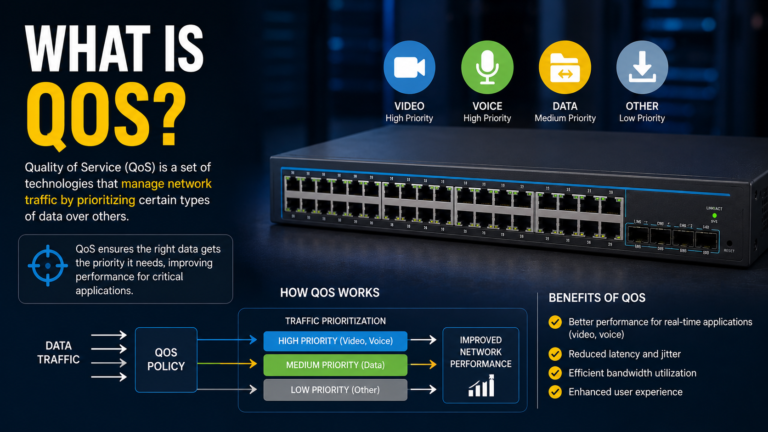
What is QoS?
Quality of Service (QoS) prioritizes important traffic.
In AV systems:
- Audio packets receive priority
- Video packets receive priority
- Control traffic remains responsive
Without QoS:
⚠️ Audio dropouts
⚠️ Video glitches
⚠️ Increased latency
Understanding IGMP Snooping
Why is IGMP Important?
Many AV-over-IP solutions use multicast traffic.
Without IGMP Snooping:
❌ Network flooding
❌ Excessive bandwidth usage
❌ Video instability
Managed switches control multicast traffic efficiently.
Common AV Problems Caused by Unmanaged Switches
Audio Dropouts
Dante traffic may compete with normal network traffic.
Video Freezing
NDI streams may overwhelm network resources.
Device Discovery Issues
AV devices may not communicate properly.
Network Congestion
Traffic cannot be prioritized effectively.
When Can You Use an Unmanaged Switch?
An unmanaged switch may be acceptable for:
Small Installations
- Single Meeting Room
- Basic Camera Setup
- Simple Internet Connectivity
Examples
- One PC
- One Camera
- One Display
No multicast traffic.
No AV-over-IP.
No complex routing.
When Should You Use a Managed Switch?
A managed switch is strongly recommended for:
Dante Networks
NDI Systems
AV-over-IP Deployments
Microsoft Teams Rooms
Zoom Rooms
Digital Signage Networks
Large Enterprise AV Systems
In modern AV environments, managed switches are often considered mandatory.
Recommended Features for AV Switches
When selecting a managed switch, look for:
✅ Gigabit Ethernet
✅ PoE+ or PoE++
✅ VLAN Support
✅ QoS Support
✅ IGMP Snooping
✅ Multicast Support
✅ Web-Based Management
✅ Network Monitoring
Popular AV-Friendly Switch Brands
Many AV deployments use:
- Cisco
- Netgear AV Line
- Aruba
- Juniper
- Extreme Networks
These platforms provide features required for professional AV networks.
Future of AV Networking
As AV systems continue moving toward IP-based architectures:
- More devices will connect to networks
- More video will travel over Ethernet
- More audio will use Audio-over-IP
This makes networking knowledge an essential skill for modern AV professionals.
Conclusion
While unmanaged switches may work for small and simple installations, managed switches provide the control, reliability, and scalability required for professional AV systems.
Technologies such as Dante, NDI, and AV-over-IP rely on advanced networking features that only managed switches can provide.
For most modern AV deployments, a managed switch is not just a recommendation—it’s a necessity.
A great AV system starts with a great network.
Key Takeaways
📌 Unmanaged switches are simple and low-cost
📌 Managed switches offer advanced traffic control
📌 Dante and NDI perform best on managed networks
📌 VLANs improve security and organization
📌 QoS helps prioritize AV traffic
📌 IGMP Snooping is critical for multicast AV systems
📌 Managed switches are the preferred choice for professional AV deployments
Tags: #AVNetworking #ManagedSwitch #NetworkSwitch #Dante #NDI #AVOverIP #EnterpriseAV #ProAV #QoS #VLAN #IGMPSnooping #AVInsider


One Comment